Install Omitly on Windows
Updated 6 Aug 2026 · Applies to Omitly 2.3.4+ · Windows
On this page
Omitly for Windows is a signed installer: download it, run it, and it works fully for 14 days before you add a licence. No account, and nothing to configure first.
On a brand-new release Windows will usually warn you about the download. That is expected, it is not a sign anything is wrong, and this article explains exactly what you will see and how to confirm the installer is genuinely ours.
Download and install
- Download Omitly for Windows from your purchase email or from the downloads page.
- Windows may warn that the file isn’t commonly downloaded (see below). Right-click the warning and choose Keep — until you do, the download does not finish.
- Open the downloaded
.exe. Confirm the publisher reads Innisfallen Pty Ltd, then choose Run. - Follow the setup wizard, then launch Omitly from the Start menu.
“Isn’t commonly downloaded”
In Microsoft Edge, a new release is usually flagged in the Downloads panel:
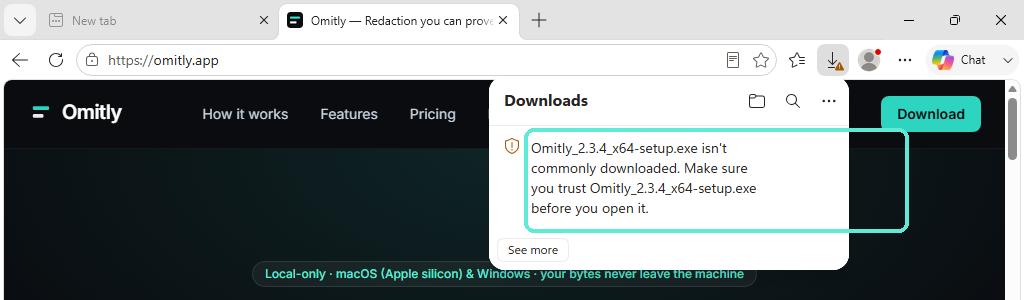
This is Microsoft Defender SmartScreen reporting on how many people have downloaded this exact file, not on whether the file is harmful. Every new version of every application starts with no download history, so the warning appears on each release and fades as more people install it. Other browsers show a similar message in their own wording.
Until you allow it, Edge does not finish the download. The file stays in your
Downloads folder as an unconfirmed .crdownload and cannot be run, so this step is
not optional.
Right-click the warning — the outlined area above — and choose Keep:
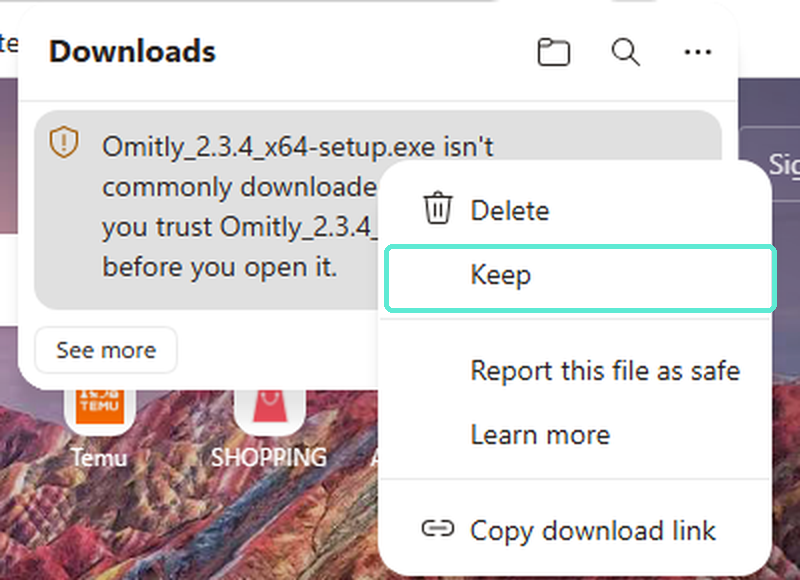
The See more button does not offer this. It only expands the list of recent downloads, which is the most common place people get stuck.
If you would rather not dismiss a warning on trust, don’t — the publisher check in the next section is the real verification, and Windows performs it cryptographically from the installer’s own signature.
The security warning when you run it
Because the file came from the internet, Windows asks once more before running it:
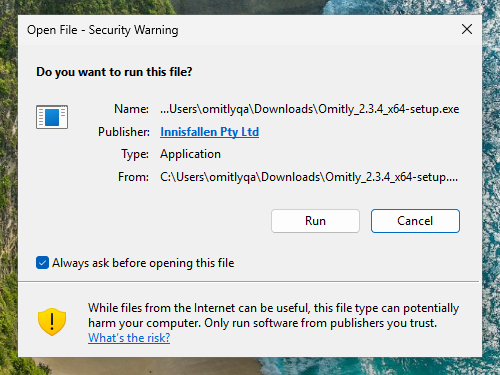
The Publisher line is the part worth reading. It should say Innisfallen Pty Ltd. That name is not typed in by us — Windows resolves it from the installer’s digital signature, and it only appears if the signature is intact. If the file had been tampered with or truncated in transit, the signature would not validate and Windows would show Unknown Publisher instead.
Our Windows installers are signed with a GlobalSign code-signing certificate issued to Innisfallen Pty Ltd. If you ever see a different publisher name, or Unknown Publisher, stop and contact support — do not run the file.
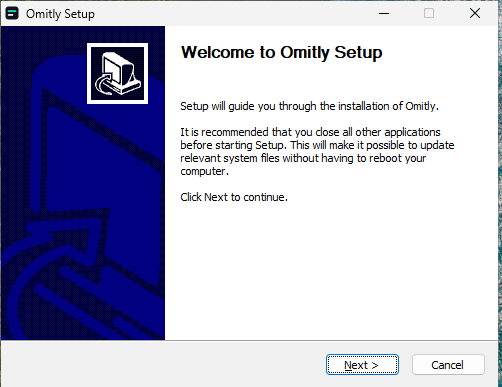
Choose Run and setup begins:
If you see “Windows protected your PC”
SmartScreen can occasionally show a stronger, blue-grey dialog headed Windows protected your PC with only a Don’t run button visible. We did not see this with the current signed release, but it can happen — SmartScreen’s verdict depends on your machine and on how new the release is.
If you do:
- Choose More info.
- Check that Publisher reads Innisfallen Pty Ltd.
- Choose Run anyway.
If the publisher does not read Innisfallen Pty Ltd, contact support instead of running it.
Before you buy a licence
A fresh install runs as a full-featured 14-day trial — redaction, verification and the certificate all work, so you can evaluate Omitly on real documents before licensing anything. Nothing is uploaded during the trial; Omitly behaves the same whether or not it is licensed.
When you are ready, your licence arrives by email after purchase and is imported in the app under Omitly → More ▾ → About Omitly → Import licence file….
Updating
Omitly checks for its own updates and prompts you when a new version is available. Updates are signed, and you choose when to install them. Because each new release is a new file with no download history of its own, you may see the “isn’t commonly downloaded” warning again if you download a new version manually from the site.
Deploying across a firm
Installing for a team rather than one machine? See System requirements, and contact us for the silent-install flags and MDM/Intune guidance.
Related
Still stuck?
Tell us what's not working — include your Omitly version (More ▾ → About Omitly) and your operating system, and we'll reply within one business day.
Report a problem with this article